SalonRenter. Renting beauty space made easy.
Find Space
Find JobsSalons for Sale
Rent calculatorHelpBlogAboutContact
List Your Space?
SalonRenter

Renting beauty space made easy

Popular Cities

  • Cary, NC
  • St. Louis, MO
  • Dallas, TX
  • Austin, TX
  • Charlotte, NC
  • Raleigh, NC
  • Atlanta, GA
  • Chicago, IL
  • San Antonio, TX
  • Plano, TX

Space Types

  • Salon Suites
  • Booth Rentals
  • Chair Rentals
  • Entire Salons

For Professionals

  • Hair Stylists
  • Barbers
  • Nail Techs
  • Estheticians
  • Lash Artists
  • Massage Therapists

Company

  • About
  • Contact
  • Help
  • Pricing
  • Meet Our Partners
  • Developers
  • Refer and Earn
  • Search Rentals
  • List Your Space
  • Blog
  • Favorites
  • Rent calculator
  • Saved Searches
  • Find Jobs
  • Jobs on SalonHires
  • Salons for Sale

Legal

  • Privacy
  • Cookie Policy
  • Terms
  • Messaging Policy
  • DMCA
  • Sitemap
  • Create Your Profile
  • For Salon Owners
Salon Renter LLC1323 SE 17th St. PMB 98194Ft. Lauderdale, FL 33316

FacebookInstagramLinkedInYouTube

© 2026 SalonRenter. All rights reserved.

We use cookies for analytics and, if you allow it, advertising. Session replay turns on only after you accept. Privacy Policy

  1. Salon Owners
  2. Listing Management
  3. Pause a Listing or Change the Space Type

Pause a Listing or Change the Space Type

Put a listing on hold without deleting it, or change booth, suite, chair, or room.

Last updated October 24, 2026

Pause (On Hold)

Use On Hold when the space is full and you may list it again later. The listing leaves search. Photos and text stay saved.

  1. Open My Listings.
  2. Find the listing.
  3. Choose Put on Hold (or the hold action in the Actions menu).
  4. To show it again, open the listing and publish or go live once a plan is active.
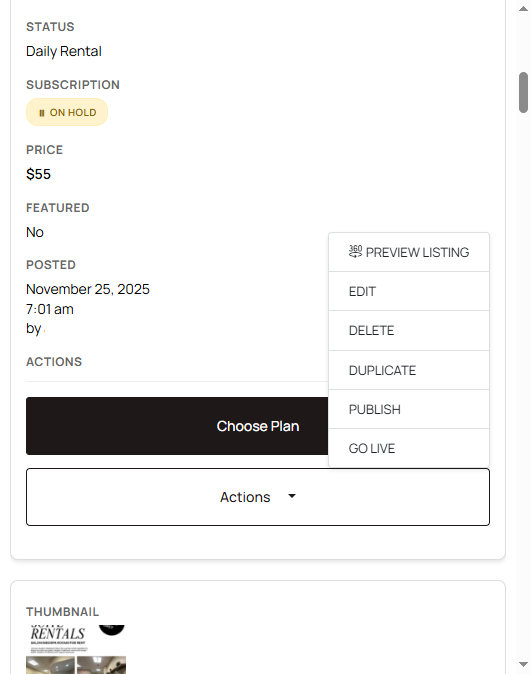
Actions menu including hold and edit

Putting a listing on hold, or deleting it, does not cancel the subscription. Listing status and billing are not linked. If you are done with Salon Renter, cancel from My Billing. See How to cancel your subscription.

Change the space type

Space type is booth, suite, chair, room, or full salon. Establishment type is the kind of business (hair, nails, lash, and similar).

  1. Open My Listings and click Edit.
  2. Change space type or establishment type.
  3. Save.
Screenshot: Space type and establishment type fields

Renters filter on these fields. A suite marked as a chair will miss people who filter for suites. Who you want to attract is a separate profile field: Who you will rent to.

Was this article helpful?

Related articles

How to Remove Your ListingListing Statuses ExplainedHow to Edit Your ListingHow to Cancel Your Subscription

Still stuck?

Contact support and we will know which guide you already read.

Contact support