SalonRenter. Renting beauty space made easy.
Find Space
Find JobsSalons for Sale
Rent calculatorHelpBlogAboutContact
List Your Space?
SalonRenter

Renting beauty space made easy

Popular Cities

  • Cary, NC
  • St. Louis, MO
  • Dallas, TX
  • Austin, TX
  • Charlotte, NC
  • Raleigh, NC
  • Atlanta, GA
  • Chicago, IL
  • San Antonio, TX
  • Plano, TX

Space Types

  • Salon Suites
  • Booth Rentals
  • Chair Rentals
  • Entire Salons

For Professionals

  • Hair Stylists
  • Barbers
  • Nail Techs
  • Estheticians
  • Lash Artists
  • Massage Therapists

Company

  • About
  • Contact
  • Help
  • Pricing
  • Meet Our Partners
  • Developers
  • Refer and Earn
  • Search Rentals
  • List Your Space
  • Blog
  • Favorites
  • Rent calculator
  • Saved Searches
  • Find Jobs
  • Jobs on SalonHires
  • Salons for Sale

Legal

  • Privacy
  • Cookie Policy
  • Terms
  • Messaging Policy
  • DMCA
  • Sitemap
  • Create Your Profile
  • For Salon Owners
Salon Renter LLC1323 SE 17th St. PMB 98194Ft. Lauderdale, FL 33316

FacebookInstagramLinkedInYouTube

© 2026 SalonRenter. All rights reserved.

We use cookies for analytics and, if you allow it, advertising. Session replay turns on only after you accept. Privacy Policy

  1. Salon Owners
  2. Listing Management
  3. Why Isn't My Listing Showing Up?

Why Isn't My Listing Showing Up?

Match the status on My Listings, then fix Pending, Needs plan, or a missing package.

Last updated October 24, 2026

Walk through a short decision guide

Listing not in search

Start with the status on My Listings. The status tells you which fix applies. You can also use the short path in Listing not showing.
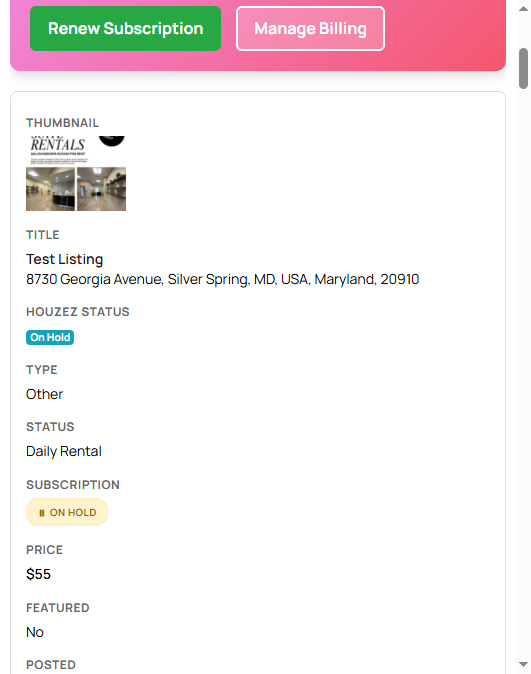
My Listings with status badges

Needs plan or Draft

The listing was saved, but it does not have an active marketing package. It is hidden from search.

  1. Open My Listings.
  2. Click Choose Plan on that listing.
  3. Finish checkout.
  4. Recheck the status.

See Purchase a marketing package.

Needs plan or Pending

Needs plan means the listing is not live because it has no marketing package or not enough listing credits. The status filter can still say Pending. It is not a review queue, and there is no review window to wait on.

  1. Open My Listings.
  2. If the listing shows Publish Listing, you already have a listing credit. Click it.
  3. If it shows Buy Additional Credits, or the page shows Add More Credits, buy more on My Listings.
  4. If it shows Choose Plan, purchase a marketing package first.

See Pending or Needs plan and Listing credits and featured credits.

Published or Live, but you still cannot find it

Search on the site can be cached, or the address may sit outside the city you typed. See Listing says live but does not appear in search.

Other statuses

Expired, On Hold, and Disapproved are explained in Listing statuses.

If a package was paid and the status never leaves Draft or Needs plan, email help@salonrenter.com with the account email and the charge date.

Was this article helpful?

Related articles

Pending or Needs PlanListing Statuses ExplainedHow to Purchase a Marketing PackageListing Says Live but Does Not Appear in Search

Still stuck?

Contact support and we will know which guide you already read.

Contact support